Sprite Sheet Helper w/ Source Code
Sprite Sheet Helper
Automatically detect sprites from a sprite sheet, fine-tune their boundaries, preview the results, and generate usable C++ sprite data.
Sprite Sheet Helper is a small, lightweight development tool created for game developers who need to turn a packed sprite sheet into individually identifiable sprites.
The program automatically analyzes the image, detects background colors, finds connected sprite regions, and creates bounding rectangles for each detected sprite.
And when the automatic detection isn't quite perfect, you can manually adjust every sprite.
✨ Features
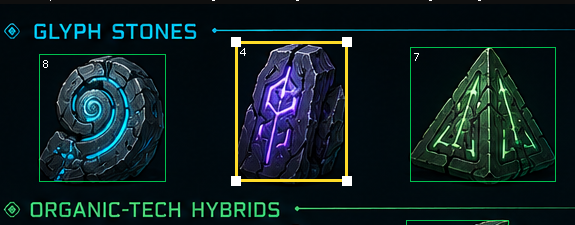
Automatic Sprite Detection
- Analyze a sprite sheet automatically
- Detect background colors from the image borders
- Find individual connected sprite regions
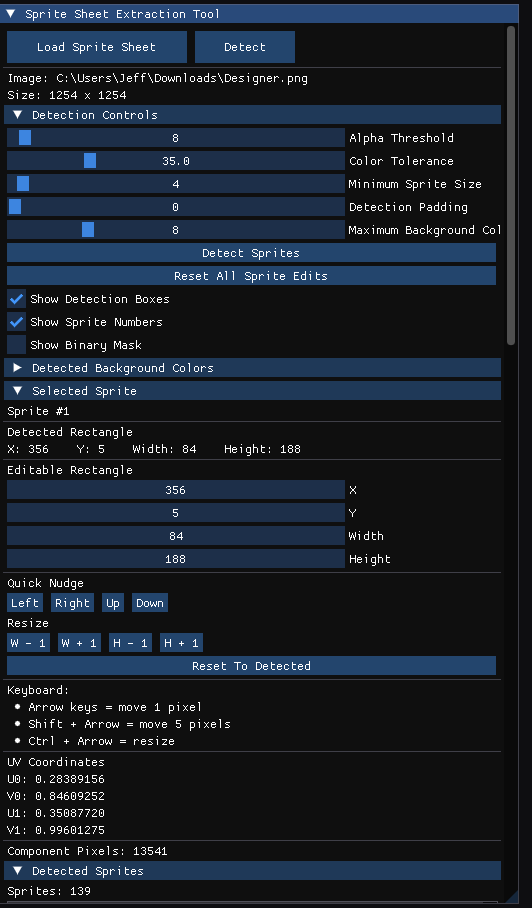
- Configurable color tolerance
- Configurable alpha threshold
- Minimum sprite size filtering
- Adjustable border padding
- Multiple background-color support
🛠️ Manual Sprite Editing
Automatic detection doesn't always know exactly what you intended.
Select any detected sprite and adjust:
- X position
- Y position
- Width
- Height
You can also:
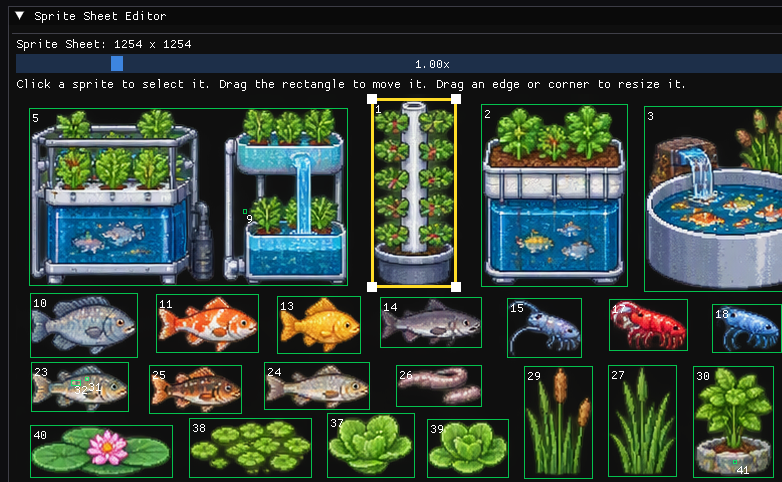
- Drag sprites directly in the sprite-sheet editor
- Resize them using handles
- Nudge them with the keyboard
- Reset an individual sprite to its automatically detected rectangle
- Reset all sprites at once
🔍 Visual Sprite Sheet Editor
The built-in editor lets you see exactly what the program thinks each sprite is.
Selected sprites can be moved and resized directly over the sprite sheet, making it easy to correct small detection errors without having to guess at coordinates.
📐 Automatic UV Coordinates
Whenever a sprite rectangle changes, its UV coordinates are recalculated automatically.
The tool handles the conversion between image-space coordinates and OpenGL-style texture coordinates for you.
👀 Sprite Preview
Preview the currently selected sprite independently from the entire sheet.
This makes it easy to verify that the rectangle contains exactly the artwork you intended.
💻 C++ Output
Once you're happy with the detected and edited sprites, the program can generate C++ data containing:
- Sprite rectangles
- Sprite UV coordinates
- Sprite count
- Ready-to-use sprite arrays
This makes it easy to take the results directly into your own OpenGL or C++ game project.
Why I Made This
I wanted a simple development tool that could take a sprite sheet and do the tedious part of figuring out where each sprite begins and ends.
Automatic detection is useful, but real artwork isn't always perfectly separated.
Sometimes a sprite has a few stray pixels.
Sometimes the background isn't completely uniform.
Sometimes you simply want the bounding rectangle to be a little larger or smaller.
So instead of making the user choose between automatic detection and manual editing, Sprite Sheet Helper combines both.
Let the computer do the initial work, then make small corrections yourself.
Built With
- C++17
- OpenGL
- GLFW
- GLAD
- Dear ImGui
- GLM
- stb_image
No game engine is required.
Who Is This For?
Sprite Sheet Helper may be useful for:
- Indie game developers
- C++ programmers
- OpenGL developers
- 2D game developers
- Pixel-art developers
- Hobby programmers
- Students learning graphics programming
- Anyone working with sprite sheets
It was especially designed with small independent game projects in mind.
Controls
Mouse
Use the mouse to select sprites and manipulate their rectangles in the Sprite Sheet Editor.
Keyboard
Arrow Keys
Move the selected sprite.
Shift + Arrow Keys
Move the selected sprite by a larger amount.
Ctrl + Arrow Keys
Resize the selected sprite.
The exact controls and editing options are also available through the graphical interface.
Requirements
Windows PC with OpenGL support.
The program is intended as a lightweight desktop development utility and does not require a game engine.
Source Code
The project is written in C++ and uses standard OpenGL development libraries.
The source code is available with the project for developers who want to study it, modify it, or incorporate ideas into their own tools.
🚀 What's Next?
Possible future improvements include:
- More sophisticated sprite segmentation
- Additional export formats
- Sprite naming
- Sprite animation grouping
- Drag-and-drop image loading
- More preview options
- Additional texture-atlas tools
- Batch processing
This is an evolving developer tool, and suggestions are welcome!
If you find Sprite Sheet Helper useful, consider following the project or leaving a comment.
Thanks for checking it out! ❤️
Purchase
In order to download this tool you must purchase it at or above the minimum price of $3.99 USD. You will get access to the following files:
Leave a comment
Log in with itch.io to leave a comment.